


Mitu AI: Prank Video Generator
4.7136.00 Reviews
App Specs
- Version
- 2.7.1
- Updated On
- License
- Free
- Downloads
- 1,000,000+
- Developer
- Astronex
- Categories
- Art & Design
- Platform
- Android
Screenshots
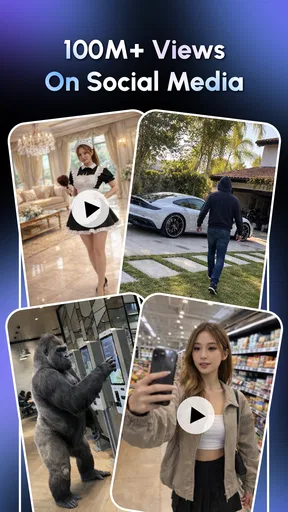
 Analysis by AppCompare
I judge a prank-video app less by how outrageous its idea sounds and more by whether I can understand the steps, make something that feels personal, and share it without turning a joke into an uncomfortable surprise. Mitu AI: Prank Video Generator is aimed at quick, playful edits built around a person’s photo. That makes it appealing for lighthearted moments, but it also puts the creator in charge of making sure the person in the video is genuinely in on the joke.
Finding your way through the creative flow
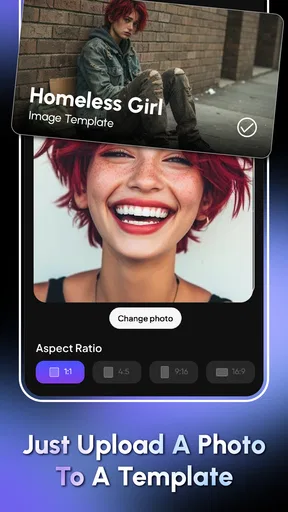
The app sits in the art and design space, though it is more about assembling a humorous result than learning a traditional editing workflow. I found the basic idea easy to grasp: start with a photo, choose a scenario, then see what the AI produces. That focused sequence is less intimidating than opening a general-purpose video editor with a timeline, layers, and a wall of controls.
That simplicity has a trade-off. A guided flow can help someone who only wants a quick gag, but it offers less room for people who like to make precise edits or build a video from scratch. If you already enjoy adjusting cuts, timing, and visual details manually, a full editor will usually give you more control. Mitu’s appeal is the shorter route from an idea to a finished prank.
For a first attempt, I would choose a clear, well-lit photo with the face easy to see, rather than a group shot or a picture taken at an odd angle. That is a practical way to give a face-based effect a better starting point, not a promise that every image will produce a convincing result. It also makes it easier to judge whether the finished clip resembles the person enough to land as friendly teasing rather than an unsettling imitation.
Comfort, consent, and different ways of taking part
A short guided process can reduce the amount of reading and decision-making needed to get started. That can be welcome when someone finds complex menus tiring, or simply wants to make one quick video without learning a new editing system. I would still take the process at my own pace: the funny idea may be immediate, but choosing a photo and deciding who should see the result deserve a little thought.
Prank videos are not automatically fun for everyone. A face-based joke can feel personal, particularly if the person did not agree to have their photo used or would not want the clip shared. My rule would be to ask first when the target might feel exposed, and to keep the audience small unless the person is happy for the video to travel further. That small pause matters more than finding the most surprising scenario.
There is also a difference between making a clip for a private laugh and posting it publicly. A friend may enjoy seeing a silly edit in a group chat but dislike having it attached to a public profile. If someone is uncomfortable with face-based transformations, I would skip their photo and choose another kind of joke instead. The app works best when the humor is shared, not imposed.
Worth Reading Before You Choose

EA SPORTS FC Mobile 26 Is a Bigger Football Game, but It Takes Time

Flipboard Shows What News Apps Must Do Beyond the Feed

Switching to Android Auto Means Rethinking Your Driving Routine

Google Calendar Makes a Crowded Week Easier to Manage

Ludo King Makes the Most of the Minutes Between Plans

Baby Panda World Brings Quick Play to Modern Phones, but Its Game Library Feels Busy
Useful in small, real-life moments
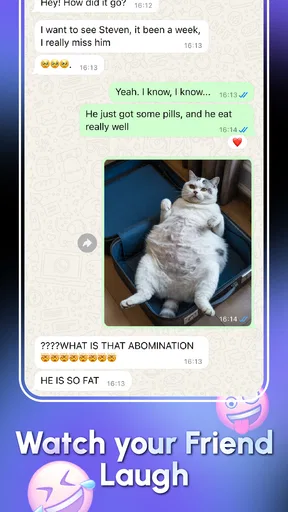
I can picture using it during a relaxed get-together: a friend agrees to be the subject, we pick a playful scenario together, and the finished clip becomes a quick group-chat surprise. That is a better fit than creating a video in secret and hoping the person will find it funny later. Keeping the creation collaborative also helps everyone decide whether the result is flattering enough to share.
It may suit people who want a visual punchline for a birthday message, a private joke among friends, or a low-effort social post. It is less suitable for a polished campaign, a carefully edited story, or any situation where the video must look exactly a certain way. If the intended use depends on precise timing, detailed captions, or a consistent professional style, I would start with a dedicated editor instead.
When I make a clip for a specific occasion, I would settle the audience before creating it. A video intended for one friend can use a more personal joke than a public post, where context disappears quickly. I would also preview the result before sending it, checking the face, the tone, and any text for details that could be misunderstood outside the room where the joke began.
What the quick approach gives up
Compared with ordinary video-editing apps, Mitu puts the prank concept first and the editing toolkit second. That can make the first steps more approachable, but the result is shaped by the available scenarios and the app’s automated treatment of the chosen photo. A general editor may require more effort, yet it is the better choice when you want to control every cut or avoid using someone’s face at all.
Variety is another practical consideration. The experience depends on having scenarios that fit both the person and the occasion; a choice that feels funny once may not suit a different friend. I would treat the app as an occasional creative tool rather than assume it will supply a fresh idea for every gathering. If you quickly run out of options, switching to a simple custom edit or another kind of joke may be more satisfying than repeating a format that has already worn thin.
It is free to start, while optional in-app purchases range from $2.99 to $149.99 per item. I would try the available experience before paying, then consider whether a particular paid option solves a real need rather than buying on impulse. The wide gap between the lowest and highest listed purchase makes it especially sensible to check the price attached to an item before confirming anything.
Unleashing Your Inner Prankster
The moment you open the Mitu AI: Prank Video Generator, you’re greeted with a sleek, user-friendly interface. It doesn’t matter if you’re tech-savvy or not; this app feels like it’s holding your hand, guiding you through every step of the prank-creating process. Just upload a photo of your unsuspecting victim, choose from a variety of funny scenarios, and let the AI work its magic.
Features That Stand Out
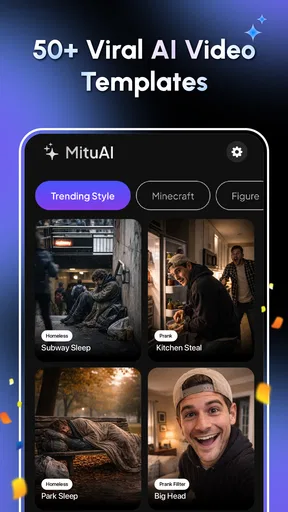
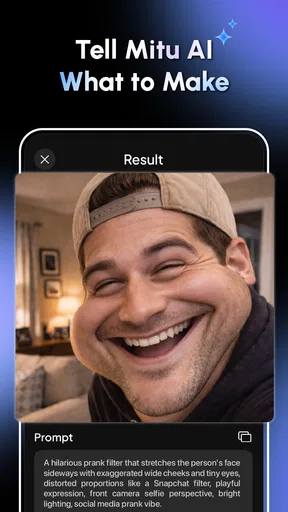
One of the coolest features is the app’s ability to map your friend’s face onto a plethora of prank videos. From dancing in a chicken suit to pretending they’re in an action movie, the options are endless. The AI facial recognition is surprisingly accurate, capturing expressions that make the final video even more hilarious.
Another feature worth mentioning is the customization options. You can tweak almost every aspect of the video, from background music to text overlays. This means you can make each prank unique and personal. It’s these little touches that really elevate the app from fun to fantastic.
Easy Peasy Pranking
Creating a prank video with Mitu AI is as easy as pie. The app guides you through the process with step-by-step instructions. Even if you’re a first-timer, you’ll have a funny video ready to share in just a few minutes. The app also allows you to save videos directly to your device or share them instantly on social media platforms. Talk about convenience!
For a more comfortable experience, I would make the clip in a quiet moment rather than while rushing between tasks. That gives me time to check the result and decide whether the joke works for the person involved. If I am helping someone who finds small on-screen controls difficult, I would let them direct the idea while I handle the taps, rather than assuming the guided flow makes every interaction effortless.
When deciding whether to save or share, I would think about the next step before creating the clip. Saving it first gives me a chance to review it privately; sharing immediately is convenient, but makes it easier to send something before checking its tone. For a joke involving another person’s face, that extra review is a useful habit, especially if the video may leave a private conversation.
Quality and Performance
Now, let’s talk about video quality. You might expect a few glitches or lags with such an app, but surprisingly, the videos are crisp and clear. The app runs smoothly without draining your phone’s battery or slowing down other processes. It’s clear that the developers have put a lot of thought into optimizing performance.
Even when a result looks clear, I would judge it in the context where it will be watched. A joke that reads well on a phone may feel different when forwarded to people who do not know the subject or the original conversation. If a clip depends on a caption or on knowing the person’s sense of humor, I would include enough context in the message around it rather than expecting every viewer to interpret it the same way.
Room for Improvement?
Of course, no app is perfect. While Mitu AI does a fantastic job of creating prank videos, there are a few areas where it could improve. For instance, adding more scenarios would keep things fresh and exciting. Currently, after a few tries, you might find yourself wishing for more variety.
Additionally, while the app is free, some of the best features are locked behind a paywall. It’s understandable, but if you’re not willing to spend, you might feel a bit limited.
Those limits matter differently depending on what you need. Someone making a one-off birthday joke may be satisfied with a small selection, while a person hoping to produce repeated posts could find the available ideas less useful over time. I would not treat a purchase as a guarantee of a particular result; the core question is whether the options currently on offer match the kind of humor I want to make.
There is a broader accessibility trade-off here: a short, visual workflow may feel easier than detailed editing, but it does not automatically suit every person or setting. Someone who prefers to avoid face-based humor, needs extensive manual control, or wants a more predictable finished video may be more comfortable with a conventional editor or a non-personal format. In my view, the best use is narrow and clear: a consensual, lightweight gag among people who already share the joke.
Who is likely to enjoy it?
I would recommend giving it a try if you like quick visual jokes, are comfortable using a friend’s photo with their permission, and do not need professional editing controls. It can also work for someone who finds a blank editing timeline daunting because the premise gives the creative task a clear direction. The best results come from choosing the subject, scenario, and audience as one decision rather than treating sharing as an afterthought.
I would skip it if you want a serious video-making tool, dislike AI face transformations, or need to produce a clip whose details can be controlled precisely. It is also a poor fit for pranks aimed at someone who may feel embarrassed or misrepresented. A regular editor, a text-based joke, or a short video that does not use another person’s likeness would be a kinder and more reliable alternative in those situations.
The app is made by Astronex and is free, with optional purchases for people who want to explore paid items. It has an Everyone content rating, a 4.4 average from around 6,600 ratings, and more than a million installs. Its listed release date is December 3, 2025; version 2.3.1 requires Android 7.0 or later. Those details make it straightforward to check whether it fits your device and comfort level before trying it.
Final Thoughts: A Must-Try for Fun Lovers
All in all, Mitu AI: Prank Video Generator is a blast. It brings out the prankster in you and guarantees a good laugh with every video. Whether you’re looking to spice up your social media or just want to have some fun with friends, this app delivers.
So, if you’re ready to dive into the world of AI-generated pranks, give Mitu AI a try. Who knows? You might just discover a new hobby or become the next big thing on your social feeds. Happy pranking!
Pros
- User-friendly interface for easy navigation.
- Wide variety of prank video templates.
- Quick rendering for fast results.
- No watermark on exported videos.
- Regular updates with new features.
Cons
- Limited free features available.
- Requires internet connection to function.
- Occasional ads can be intrusive.
- Some templates might lack originality.
- In-app purchases can get expensive.
FAQs for Mitu AI: Prank Video Generator
What is Mitu AI: Prank Video Generator?
Mitu AI: Prank Video Generator is an innovative app that allows users to create entertaining prank videos using AI technology. It provides a wide range of customizable templates and effects to make realistic and humorous videos. The app is designed to be user-friendly, making it accessible for everyone, even those without video editing experience.
Is Mitu AI: Prank Video Generator free to use?
Mitu AI offers a free version with basic features and templates. However, to access premium templates, effects, and additional functionalities, users may need to subscribe to a paid plan. The subscription options vary, offering monthly and annual plans to suit different user needs.
How easy is it to create a prank video using Mitu AI?
Creating a prank video with Mitu AI is straightforward and user-friendly. The app features an intuitive interface where users can select templates, add effects, and customize their videos with a few taps. Even those with no prior editing skills can quickly produce high-quality prank videos.
What kind of prank videos can I create with Mitu AI?
Mitu AI offers a diverse range of prank video templates, from light-hearted and funny to more elaborate scenarios. Users can choose from categories such as fake news reports, celebrity impersonations, and more. The AI-powered tools ensure realistic and convincing results, making them perfect for sharing on social media.
Is Mitu AI available for both Android and iOS?
Yes, Mitu AI: Prank Video Generator is available for both Android and iOS platforms. Users can download it from the Google Play Store or Apple App Store, ensuring compatibility with a wide range of devices. Regular updates ensure the app runs smoothly across all supported models.


